
How to Makes Airport Cab Operations Simple & Efficient ?
Managing airport transfers shouldn't be complicated. Cabsware takes the friction out of cab operations at India's busiest airports- from the moment a passenger walks up to your counter until the vehicle returns to parking.What You Get
1. Counter Booking That Actually Works
Your counter staff see available cabs instantly no hunting through systems, no outdated information. They book a ride in seconds by entering the drop location, passenger details, and fare. That’s it. The driver gets notified immediately, and the booking is live.
2. Drivers Know Right Away
The moment you hit “confirm,” drivers get a push notification with full trip details on their driver app. No phone calls, no confusion, no back-and-forth. They see exactly where they’re going and who they’re picking up.
3. Your Parking, Organized
Whether you manually check cabs in as they arrive or use automatic location tracking (geofencing), Cabsware keeps tabs on every vehicle. You always know what’s in the lot and what’s on the road.
4. Smart Dispatch, Your Way
Use a first-come, first-served system where the longest-waiting cab gets the next booking? Cabsware handles that automatically. Or pick specific vehicles manually for each trip, whatever matches your operation. Both methods work seamlessly.
5. Spot Problems Before They Become Problems
If a driver hasn’t returned to parking within the expected time, the system flags it. You get a daily report showing which drivers are running late or which trips are taking longer than normal. This isn’t about blame, it’s about understanding your operation and staying on top of vehicle availability. When you know the patterns, you can fix them.
Why Airport Operators Choose Cabsware
It’s built for India’s airport environment. Real terminals, real pressure, real passenger volume. Not some generic taxi app trying to do everything. We do airport transfers, and we do them well.
Your team works faster. Your drivers stay informed. Your fleet stays organized. Your passengers get consistent, reliable service. That’s what smooth airport operations look like.
Cabsware is designed for effortless airport cab management in India. Multiple user roles ensure smooth control for every team member.
Key User Roles & Logins
- Vendor/Admin Panel: Add drivers, manage fleet, create sub-admins.
- Parking Supervisor Login (Optional): Manual or geofence-based parking entry.
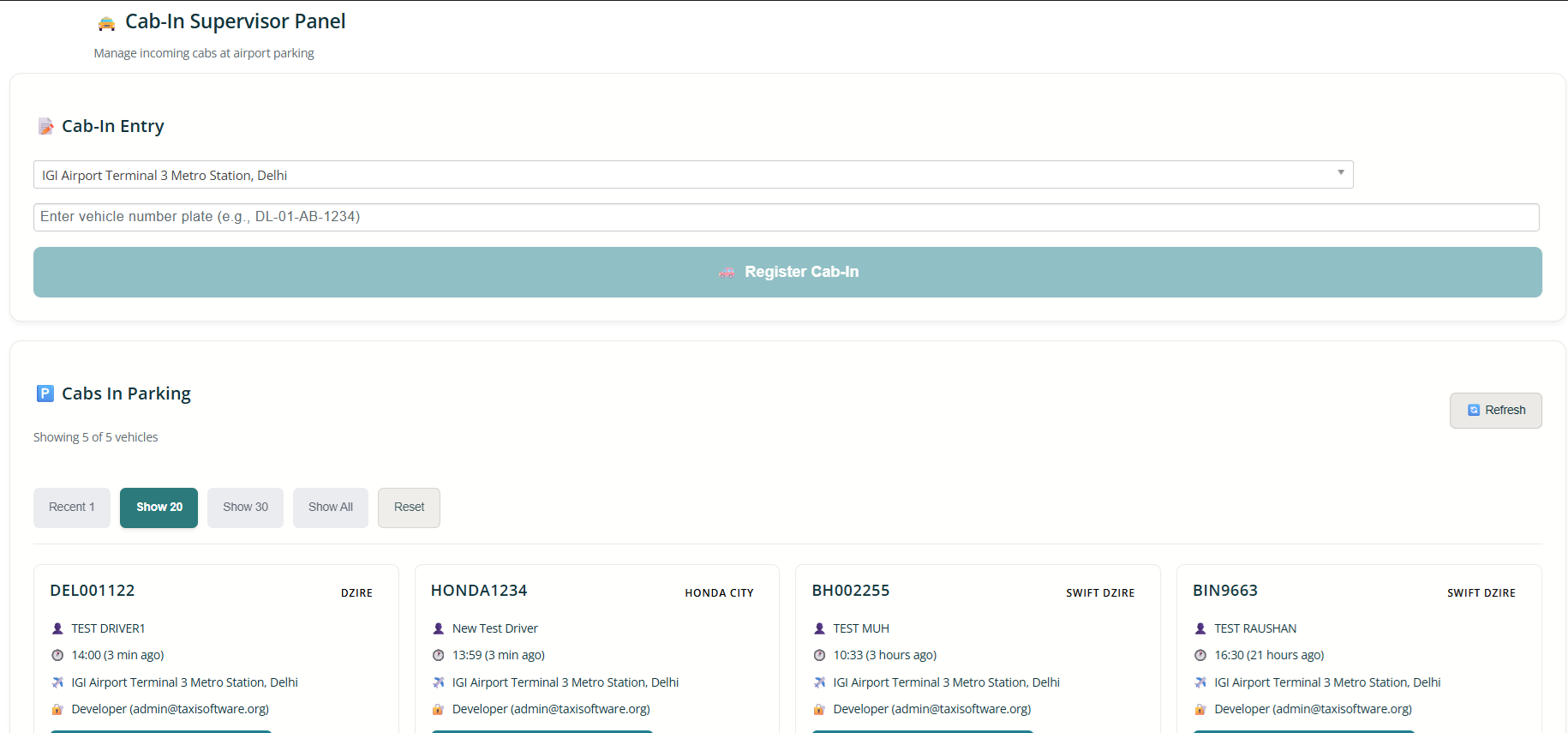
- Supervisor types 2–4 digits of vehicle number → system auto-fetches registered vehicle & driver → one click to mark “In Parking”.
- Optional vehicle cleanliness checklist.
- Driver Mobile App: Receive bookings, view details, start trip, complete ride.
- Counter Booking Executive Login: Fastest on-counter booking system.
Scenario 1: You Have Your Own Airport Counter
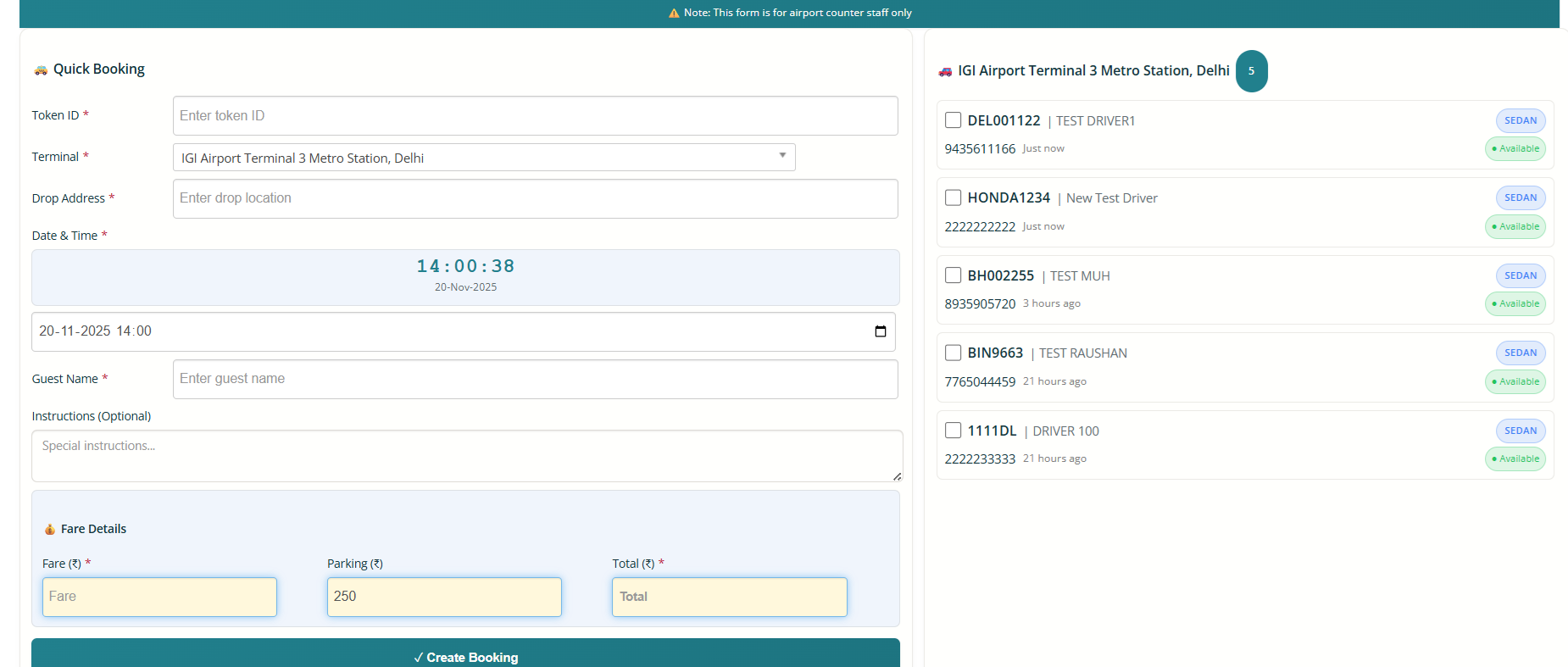
One-screen instant booking & dispatch:
- Executive sees only vehicles parked at current terminal (e.g., T1 or T2 in Mumbai).
- Enter: Drop location → Guest name → Mobile (optional).
- System auto-fills fare (based on pre-set slabs) + parking charges.
- Choose vehicle manually or let system auto-select (FIFO – First In First Out).
- Click “Create Booking” → Booking created + instantly dispatched.
- Driver gets notification + loud ring → No accept/decline needed → Trip starts instantly (no OTP required as payment already collected at counter).
Entire process under 15 seconds. Zero waiting, maximum vehicle utilisation.
Scenario 2: You Supply Cabs to Third-Party Airport Counters
- Use laptop or mobile to create booking from duty slip.
- Enter: Duty slip reference ID + Drop address + Guest name + Fare amount.
- Select from live available vehicles list → Create → Instantly dispatched.
- Driver receives full trip details → Starts trip directly (no OTP by default).
- Perfect for B2B airport transfer partnerships.
Smart Driver Monitoring & Defaulter Alerts
- Return-Time Monitoring: After trip ends (e.g., 40-min ride), system expects driver back in parking within 60 minutes. Late → auto-flagged in reports.
- Trip Duration Monitoring: If trip runs longer than expected → auto-flagged for follow-up. Daily defaulter reports help maintain discipline and ensure maximum cabs stay available.
Result: Higher vehicle rotation, zero idle time, full control, delighted customers.
Ready to see it live?
Book a free demo today or call us. Experience India’s simplest airport cab management software.
Screen shots for your quick refernce:-
1. Instant Counter Booking Dashboard: Create & dispatch bookings in under 15 seconds. Shows only vehicles in your terminal parking + auto fare calculation.
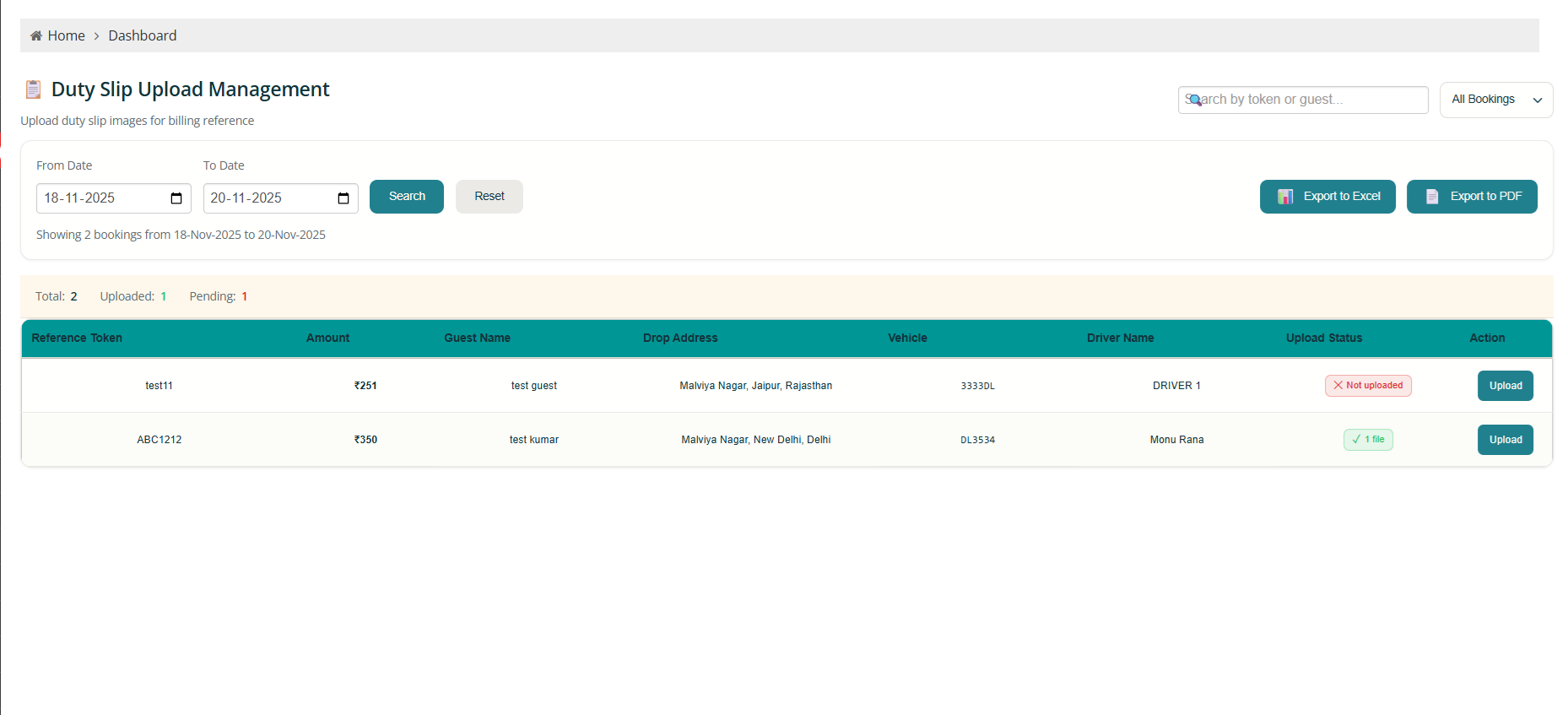
2. Duty Slip Management: Upload duty slips for B2B billing. Track pending uploads, export reports – zero paperwork disputes.
3. Parking Supervisor Panel: Type 3-4 digits of number plate → instant cab registration. Live list of all parked vehicles with entry time.
Frequently Asked Questions – Cabsware Airport Management Software
General Understanding
What is Cabsware Airport Management Software?
Cabsware car rental software is a complete airport transfer management solution designed for cab operators, fleet providers, and airport ground transportation services. It handles everything from vehicle parking check-ins to booking dispatch, driver management, and real-time availability tracking all from a centralized system.
Who uses Cabsware?
The system supports multiple user roles: vendors who manage driver fleets, drivers who use the mobile app for trip execution, parking supervisors who handle vehicle check-ins, and booking counter staff who create and dispatch rides. Each role gets a tailored interface for their specific responsibilities.
Do I need technical expertise to use Cabsware?
No. The system is designed for operational staff at airports counter personnel, supervisors, and drivers not IT teams. Most actions happen on a single screen with minimal data entry. If you can use a smartphone or basic computer, you can use Cabsware.
Booking & Operations
How does the booking process work?
It depends on your setup. If you operate your own airport counter, staff simply enter the drop location, passenger details, and select an available vehicle (or let the system auto-assign). The booking is created and dispatched to the driver instantly. If you’re providing fleet services to a partner with an airport counter, you reference their duty slip and enter the details into the system same fast dispatch process.
Can the system automatically assign vehicles to bookings?
Yes. Cabsware supports first-in-first-out (FIFO) logic, which automatically assigns the vehicle that’s been waiting longest in the parking queue. You can also manually select vehicles if your operation requires that level of control.
How do drivers receive bookings?
Drivers get instant push notifications on their mobile app as soon as a booking is created. The notification includes all trip details passenger name, contact, drop location, and fare. No need for phone calls or manual coordination.
Does the passenger need to share an OTP with the driver?
By default, no especially when payment is already settled at the counter. However, if your process requires OTP verification for added security or partner requirements, we can enable that feature. It’s configurable based on your workflow.
What if the fare varies by distance or zone?
You can set up fare slabs in the system based on distance radius or specific zones. When the booking staff enters a drop location, Cabsware automatically calculates and fills in the fare amount. This eliminates manual fare calculations and reduces errors.
Vehicle & Driver Management
How do I add drivers to the system?
Vendors log into their panel and register drivers directly. Each driver is then given access to the Cabsware mobile app, where they manage their trips and availability.
What is the parking supervisor’s role?
A parking supervisor manually or semi-automatically logs vehicles as they arrive at the airport parking area. They can type a few characters from the license plate, and the system pulls up the full vehicle and driver details for quick check-in. Supervisors can also perform vehicle cleanliness or quality checks if that’s part of your process.
Can I track vehicle availability in real time?
Absolutely. The booking screen shows all available vehicles at a specific terminal in real time. For example, if you’re at Terminal 1, you see only the vehicles parked and ready at T1 no confusion, no delays.
Does Cabsware work with geofencing?
Yes. If you prefer automated vehicle tracking, geofencing can handle parking check-ins without manual supervisor input. However, many operators prefer the supervisor model for quality control and verification, so we support both approaches.
Monitoring & Reporting
What are “defaulter drivers,” and why does it matter?
Defaulter drivers are flagged when they don’t follow expected timelines either they take too long to return to the airport parking after a trip, or a booking runs significantly longer than expected. Tracking this helps you maintain vehicle availability, identify performance issues, and ensure consistent service quality.
How does the system detect late returns?
After a trip is completed, Cabsware calculates the expected return time: actual trip duration plus a 20-minute buffer. If the driver hasn’t returned to parking within that window, the system flags them in your daily report. You can then follow up or take corrective action.
What if a trip takes longer than expected?
If a booking exceeds its estimated duration by a significant margin (for example, a 40-minute trip stretches to 90 minutes), Cabsware automatically flags it. This alerts you to possible issues – traffic jams, passenger delays, or operational hold-ups – so you can manage expectations and availability better.
Can I see reports on daily operations?
Yes. The admin dashboard provides daily reports on vehicle movements, trip completions, late returns, and flagged bookings. This gives you a complete operational snapshot without manual tracking or spreadsheets.
Setup & Integration
How long does it take to set up Cabsware?
Setup time depends on your operation size and complexity. For a basic airport counter operation, you can be up and running within a few days. Larger fleets with multiple terminals, vendors, and custom workflows may take a couple of weeks for full onboarding and training.
Do I need to install anything on-site?
Cabsware is a cloud-based SaaS platform. Counter staff and supervisors access it via web browser on any computer or mobile device. Drivers use the dedicated mobile app on Android. No servers, no local installations required.
Can Cabsware integrate with my existing systems?
Yes, in many cases. If you have existing CRM, accounting, or payment systems, we can discuss integration options during the setup process. Our goal is to fit into your workflow, not force you to change everything.
What about training for my team?
We provide live demonstrations and training sessions tailored to each user role – vendors, drivers, supervisors, and counter staff. Most users find the system intuitive after a single training session because it’s designed around real airport workflows.
Pricing & Support
How is Cabsware priced?
Pricing depends on your operation size, number of users, vehicles, and specific features you need. Contact us for a customized quote based on your requirements.
Is there a trial period or demo available?
Yes. We offer live demonstrations so you can see exactly how Cabsware works for your operation. Fill out the form on our website or call us directly to schedule your demo.
What kind of support do you provide?
We provide ongoing technical support via phone, email, and chat. Our team understands airport operations and can help troubleshoot issues, answer questions, or guide you through configuration changes.
Can I scale Cabsware as my operation grows?
Absolutely. Whether you add more vehicles, expand to new terminals, or bring on additional vendor partners, Cabsware scales with your business. Cloud-based infrastructure means no hardware upgrades or capacity limits.
Technical & Security
Is my data secure?
Yes. Cabsware uses industry-standard security protocols to protect your operational data, driver information, and passenger details. Data is encrypted in transit and at rest.
What happens if there’s an internet outage at the airport?
While Cabsware requires an internet connection for real-time updates and dispatch, the driver app stores essential trip details locally so drivers can continue their current trips. Once connectivity is restored, all data syncs automatically.